

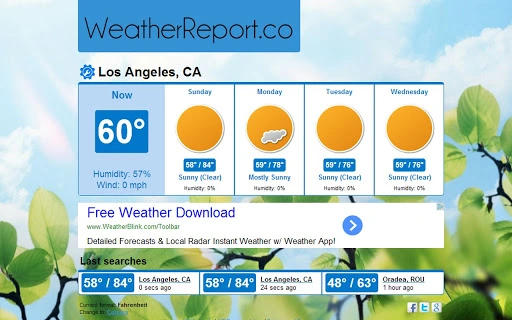
Description
Download WeatherReport.co App – Weather Forecast, Weather Tool, Weather API
Overview
The WeatherReport.co App delivers accurate, real-time weather data and forecasts for users across the globe. Designed to provide localized weather insights based on the user’s internet provider location, the app offers detailed forecasts for current conditions and up to four days ahead. It serves as a reliable tool for individuals seeking immediate access to key meteorological metrics such as wind speed, humidity levels, and temperature trends. The app supports multiple global locations, making it useful for travelers, outdoor planners, and professionals who rely on timely weather updates.
Target users include both casual consumers and professionals in fields such as logistics, agriculture, and event management who require dependable weather intelligence. The developer, WeatherReport.co, appears to focus on delivering accessible, lightweight weather solutions through a clean, intuitive interface. While no further details about the company’s background are available, the app’s functionality suggests a strong emphasis on data accuracy and user customization. Real-world use cases include monitoring daily weather patterns for commuting, planning outdoor activities, or integrating weather data into personal or business websites via the available API.
Key Features & Capabilities
- Real-Time Weather Data – Displays current weather conditions based on the user’s location, determined through internet provider information.
- Four-Day Forecast – Provides humidity and wind speed predictions for the next four days, enabling users to plan ahead.
- Temperature Unit Toggle – Allows switching between Celsius and Fahrenheit to suit regional preferences.
- Customizable Interface – Users can modify background images and text colors to personalize the app’s appearance.
- Weather API Access – Offers a developer-friendly API for embedding weather data into websites or third-party applications.
These features support practical daily use, such as checking morning conditions before leaving home or assessing weather risks for a weekend trip. The ability to switch temperature units enhances accessibility for international users. The customizable interface improves user engagement by allowing personalization without compromising functionality. For developers, the API enables integration with web platforms, making the app a versatile tool beyond standalone use. The lightweight design ensures minimal system impact while maintaining core functionality.
User Interface, Workflow & Performance
The app features a streamlined user interface focused on clarity and ease of access. Navigation is straightforward, with essential weather metrics presented in a clean layout. Users can quickly view current conditions, forecast trends, and adjust settings without navigating complex menus. The workflow is optimized for speed, allowing users to retrieve weather information with minimal interaction.
Performance details were not specified by the developer. However, given the app’s small size of 5.3 MB and its focus on data retrieval rather than intensive processing, it is expected to operate efficiently on modern systems. The developer did not provide additional system requirements or resource usage details. General software behavior patterns suggest stable operation under normal conditions, with minimal CPU or RAM impact. The app is designed to run in the background without disrupting other tasks, though specific stability metrics were not disclosed.
Compatibility & System Requirements
The WeatherReport.co App is compatible with Windows, Mac, and Linux operating systems, making it accessible to a broad user base across different computing environments. It is available in version 1.0.0 with a file size of 5.3 MB, indicating a lightweight installation that requires minimal disk space. The developer did not specify exact system requirements, including minimum RAM, processor speed, or storage needs.
Platform compatibility information is limited to the supported operating systems. No details were provided regarding hardware specifications or installation prerequisites. Users are advised to ensure their system meets standard desktop software requirements for running applications on Windows, Mac, or Linux. The app’s small footprint suggests it should function on most modern devices, but specific compatibility testing is recommended for older or low-resource systems.
Pros and Cons
Pros
- Lightweight at just 5.3 MB
- Available for Windows, Mac, and Linux
- Real-time weather data based on location
- Customizable interface with background and text color options
- Supports temperature unit switching (Celsius/Fahrenheit)
- Includes a developer API for website integration
Cons
- No detailed system requirements provided
- Performance and resource usage not specified
- Location accuracy depends on internet provider data
- Forecast limited to four days
- Customization options are limited to visual elements
FAQ Section
Is the WeatherReport.co App free to download?
Yes, the app is available at no cost. It does not require a subscription or payment to access core features.
Can I use the WeatherReport.co App offline?
The app requires an active internet connection to retrieve weather data. Offline usage is not supported.
What operating systems does the app support?
The app is compatible with Windows, Mac, and Linux systems.
Is the weather API safe to use?
The developer did not provide specific security details. However, the API is intended for public use and should be integrated following standard web development best practices.
How often does the app update weather data?
Weather data is updated in real time based on the latest available information from the source. The frequency of updates depends on the data provider’s refresh cycle.
Final Thoughts + CTA
The WeatherReport.co App stands out as a lightweight, accessible tool for users seeking accurate weather forecasts and customizable display options. Its multi-platform availability and built-in API make it a practical choice for both individual users and developers. While some technical details remain unspecified, the app delivers core functionality effectively with a clean interface and minimal system footprint. It is particularly well-suited for those who need quick, reliable weather insights without the complexity of larger applications.
Download WeatherReport.co App now
Guides & Tutorials for Weather Report App for Chrome
How to install Weather Report App for Chrome
- Click the Preview / Download button above.
- Once redirected, accept the terms and click Install.
- Wait for the Weather Report App for Chrome download to finish on your device.
How to use Weather Report App for Chrome
This software is primarily used for its core features described above. Open the app after installation to explore its capabilities.
User Reviews for Weather Report App for Chrome 0
No reviews found





